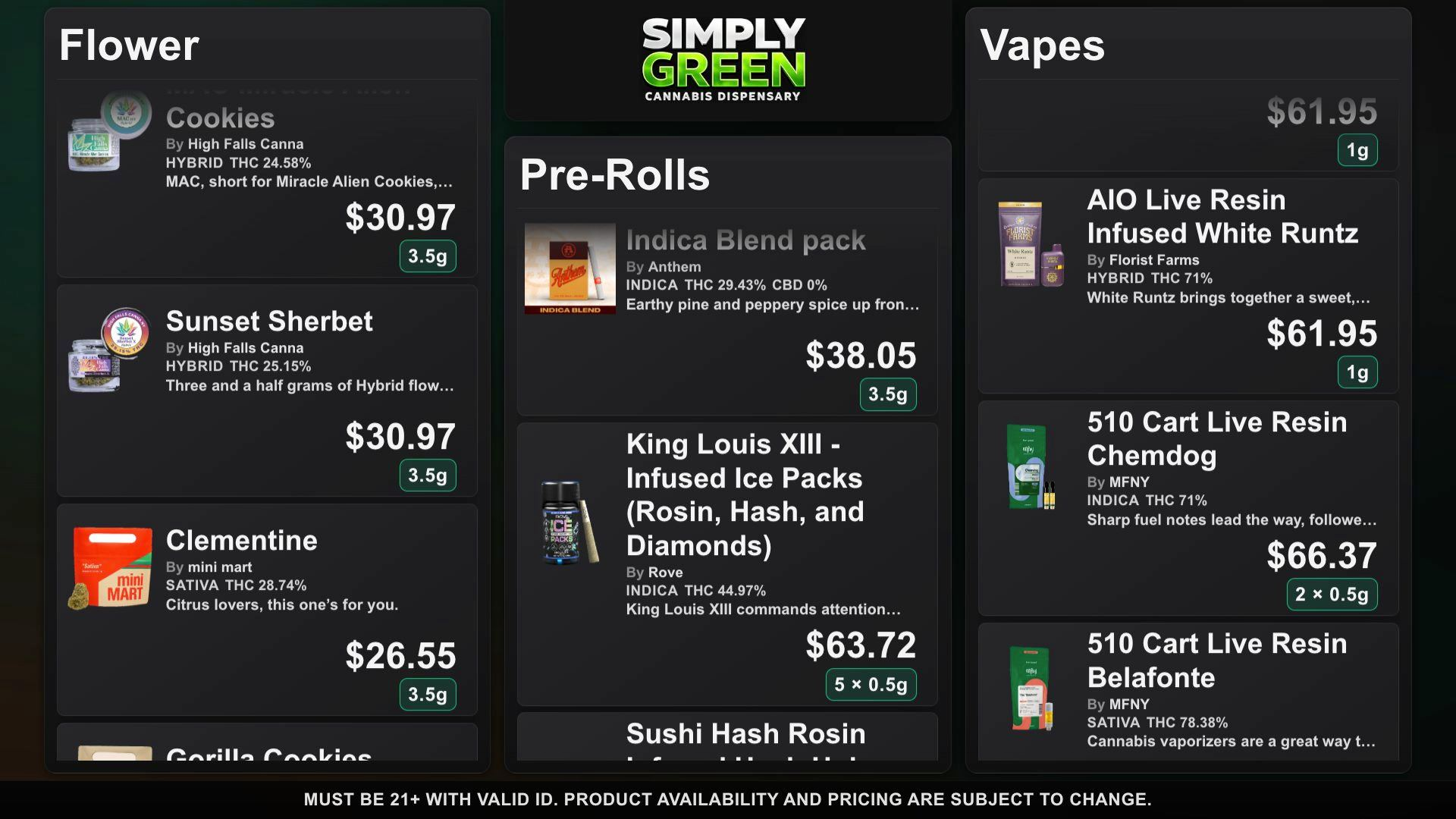
Cannabis menu board software manages what appears on TVs at a dispensary. The key buying question is how a product update moves from the source of truth to the display. A static presentation can be cheap but requires someone to rebuild slides. A POS-connected signage service may automate stock updates but usually brings different integration and contract terms. DubMenu gives staff direct editing control and automatically refreshes Dutchie and Weave IQ menus about every 15 minutes while a TV is active.
Before committing to a vendor, write down the number of screens, who updates prices, how quickly out-of-stock products must disappear, whether the menu also belongs on customer phones, and what your actual POS exposes. Test on your own screen in the shop. One attractive screenshot does not tell you whether the workflow holds up during a busy shift.
Start with the inventory workflow
If the board must track the POS automatically, request a documented connector for your exact POS and verify its refresh interval, failures, and mapping for variants. GreenScreens publishes a POS compatibility list and automatic refresh claims. DubMenu automatically refreshes Dutchie public menus and Weave IQ menus about every 15 minutes while a TV is active. Stock, prices, deals and new products stay current; staff can edit from a phone. Menus you enter by hand stay under manual control. For other POS systems, confirm the vendor’s connector.
Look beyond the number of screens
DubMenu TV supports up to four paired browser displays at one location under the $99 monthly location price. Those displays share a catalog and can show different subsets of its categories. A business needing five screens or separate catalogs per screen should confirm that a different product supports that setup. GreenScreens lists no published screen cap for its Starter tier at $150 per location per month plus a published $200 setup fee as of September 28, 2026. That tier also offers POS connectivity; price alone is not a feature comparison.
Test the staff editing path
Ask a staff member to change one price, hide a sold-out product, and preview a special while standing at the counter. DubMenu puts the catalog dashboard on their phone. Its TV renderer can show product images, weights, available cannabinoid details, and manually edited specials. It offers 24 themes with full color, logo and font control, independent layouts, continuous scroll and timed page rotation. DubHaven designs bespoke boards on request: custom layouts, typography and animated ambient backgrounds built around your brand. Try both dense and image-led menus from the customer line; a design that reads on a laptop may not read from several feet away.
Price the whole publishing surface
TV and QR are separate DubMenu subscriptions: $99 per month for TV, $30 for the hosted mobile QR product, or $129 together at one location. The QR product includes a permanent link, searchable hosted menu, optional custom HTTPS destination, website iframe, and printable exports. Neither subscription includes the screen, network, or installation labor. Both start with a 30-day card-required trial with no subscription charge during the trial and no setup fee. Calculate annual-billing requirements for cheaper per-screen signage offers separately.
Review rules and responsibility
Any menu board can display wrong information if a source import is stale or staff enter a wrong price. Ask vendors how they show the last update, handle missing images, and identify sync errors; do not infer a feature from the word live. DubMenu has an editable disclaimer and a shared 21+ site gate, not a legal certification. The operator must check local regulator rules for promotions, price display, age restrictions, and medical-market messages before publishing.
Shortlist with a live comparison
Open the board demo on the hardware you intend to mount. Compare a four-screen location against per-screen billing and setup fees. Read each vendor’s own pricing and integrations page; a missing price is not zero and an unlisted connector is not necessarily absent. For example, generic signage platforms may cost less but require a separate way to create and refresh the cannabis catalog. A POS-first service may cost more but eliminate some manual reconciliation. Pick the workflow your team can actually maintain.
Frequently asked questions
Does DubMenu refresh inventory automatically?
Yes for Dutchie public menus and Weave IQ menus: stock, prices and deals refresh about every 15 minutes while a TV is active. Other POS systems are not connected; Menus you enter by hand are edited by hand.
What should I verify in a vendor demo?
Change a price, hide an item, review a failed or old import, test legibility at a customer’s distance, and ask about screen limits and annual billing.
Do generic signage services cost less?
Some publish lower per-screen prices. Confirm whether a cannabis catalog editor, stock workflow, hardware, and any third-party feed fees are included.