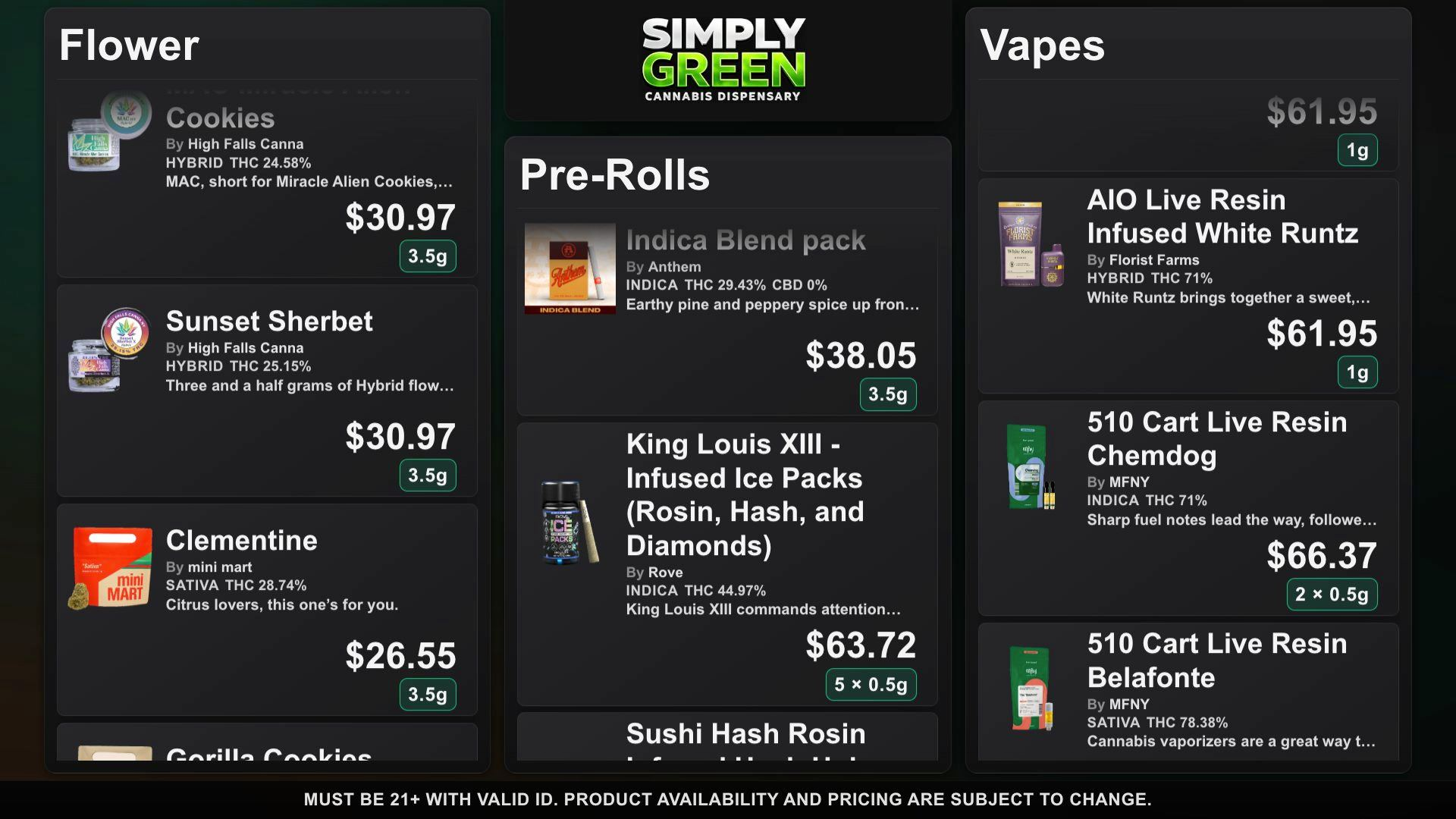
DubMenu can read a public Dutchie menu URL, prepare an imported catalog for review, and publish that catalog to a TV you pair with a code. The saved menu refreshes stock, prices, deals and new products automatically about every 15 minutes while a TV is active. DubMenu does not write back to Dutchie. Dutchie ecommerce remains its own online storefront and ordering workflow.
Treat the process as three separate tasks: get the correct public source, inspect the imported product data, and maintain the display after the first day. The board refreshes automatically from the saved Dutchie menu while a TV is active. Staff can also force a full re-import with Re-sync menu.
Find a customer-visible source
Use the public URL where shoppers can see your Dutchie menu. Do not paste an administrator address, private dashboard, or credentials. The DubMenu import instructions explain the current accepted URL formats and how the importer maps available public product fields. Dutchie has separate help documentation for embedding its ecommerce pages on a website; an embed is not the same as copying product fields into DubMenu. If your source is not a public Dutchie menu, check whether a Weave IQ or DubLedger link fits instead, or enter products by hand.
Review names and categories
Inspect the products in DubMenu after import rather than publishing sight unseen. Confirm category grouping, product names, makers, package weights, pictures, and any cannabinoid values against your working inventory. Not every source includes every field. If a source changes its labels, a mapped field may need attention. Do not treat an uncertain match as a confirmed product identity. Staff can edit the catalog in the dashboard before it goes onto the screen, and should decide which categories belong on each paired display.
Verify prices, stock, and promotions
A screen should show what customers can actually buy at the stated price. Compare imported pricing and availability against the source and the point of sale before publishing. Promotions may need a manual Featured Deal or specials edit; do not assume every ecommerce promotion maps to the TV. A dashboard edit in DubMenu is pushed to connected TVs, but that edit does not write back to Dutchie. Maintain one human review path so the two surfaces do not quietly diverge.
Connect a browser-equipped TV
Open the TV pairing address on your intended screen or streaming device. Use the displayed six-digit code from an authorized phone session to pair it with the right location. Repeat for up to four screens. Each screen shares the same product catalog but can show a different category subset. Test the board at normal viewing distance: product photos can help recognition, while prices and weight details must remain readable. Choose among 24 themes with full color, logo and font control, or ask DubHaven for bespoke layouts, typography and animated ambient backgrounds.
Automatic refresh and full re-import
Connect a Dutchie public menu and DubMenu checks stock, prices, deals and new products about every 15 minutes while a TV is active. A board or editor opening also prompts one check, at most every few minutes. A partial source fetch does not hide other products. Re-sync menu forces a full source re-import when you need one; that replaces the product list and can overwrite hand edits. Staff can still verify the result and make phone edits.
Price the TV and optional phone route
DubMenu TV costs $99 per location per month for up to four paired browser displays. QR Menu costs an additional $30 per location per month and can publish the shared catalog to a hosted searchable phone menu, with a permanent QR destination that can also redirect to your own HTTPS page. Using both totals $129 monthly in two subscriptions. Each product has a 30-day card-required trial with no subscription charge during the trial and no setup fee. TV hardware and network access are yours to provide.
Keep the boundary clear
Dutchie describes ecommerce and online ordering on its public business page. DubMenu TV is a display; it does not take a customer’s order or replace Dutchie ecommerce. The site age gate and editable disclaimer do not certify the content against local law. Operators should verify promotional claims, potency, medical-market restrictions, and placement with their state regulator or counsel. Source details and prices should be rechecked before printing signs or training new staff.
Frequently asked questions
Does DubMenu request a Dutchie password?
No. The import starts from a public menu URL, not an administrator login. Follow the DubMenu import documentation for the accepted format.
Does changing DubMenu update Dutchie?
No. Edits to the DubMenu catalog affect its connected displays, not the original Dutchie ecommerce or POS records.
Do I need to import again after source changes?
No. A saved Dutchie menu refreshes automatically about every 15 minutes while a TV is active. Use Re-sync menu to force a full re-import when needed; it can replace manual edits.